Woman And computer
Human And Computer
Showing posts with label Twitter. Show all posts

Six of the Best 135

Virtually Naked hails an improbable liberal hero. Eric Pickles today said: "�Many councils are internet-savvy and stream meetings online, but some don�t seem to have caught up with the times and are refusing to let bloggers or hyper-local news sites in. With local authorities in the process of setting next year�s budget this is more important than ever."

When I began writing, the four-volume Penguin edition of George Orwell's journalism was my bible. The Worcester Libertarian reviews a new selection of his articles for the Observer.

"The collapse of the Gadhaffi regime is a blow to Putin�s influence strategy, a massive loss to Russian exports,  and a personal setback for Putin himself," argues The Slog.

The problem is not that young people do not want to join the Scouts, says the Gyronny Herald, it is that there are not enough adults involved to enable them to do so.

Are group blogs the future or will individual blogs turn increasingly niche? Doctor Huw ponders the future of blogging.

From the North remembers Nicholas Courtney (Brigadier Lethbridge-Stewart) whose death was announced today. Its writer "had the great good fortune to meet Nick, socially, on several occasions and found him to be one of the nicest, gentlest and funniest actors I've ever crossed paths with".

Find Followers - Use Twitter Lists

Grow your network and discover people to follow using Twitter Lists...

I manage a number of twitter accounts and have lots of lists and I really believe these lists are a useful tool to increase follower numbers and blog readers.  So with New Year in mind perhaps it's time to create a few, or follow a few...
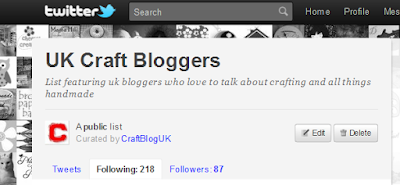


The list I keep for @craftbloguk can be found here - http://twitter.com/CraftBlogUK/uk-craft-bloggers/members (it needs updating and that's the only downside of a list)  It just takes a click to add someone to a list and if you do this each time you follow or find a new tweeter it's easily manageable.

Lists are a great way to increase followers and  find followers through networking with curated groups of tweeters that share common goals or interests. 

Curating twitter lists is simple, no special skills needed whatsoever.  To make a list just click on the tab 'lists' on your twitter home page and click 'create a list' - the instructions are easy to follow.  Even simpler than creating a list is finding a list and either following the list or clicking through to 'following' and finding individual people to follow. 


Following others is a good way of introducing yourself and of course your blog, the idea is they will follow you back. That's not always the case, but sitting back and expecting followers to find you is going to get very boring!  There are three tabs when you click on someones list, tweets, following and followers.  Clicking on Following or Followers will give you a list of people with the green 'follow' buttons beside each name so when you have the time, look through and follow, follow, follow!  Take care not to overdo it or twitter will not be happy and think you are a spammer as well as other people who see your follow/follower ratio.  You can use services like Friend or Follow to find out who hasn't followed you back.

It's a great idea to tweet a curator of a list and congratulate them on their list, especially if it's a network that you want to be a part of - the fact they have created a list shows they are passionate about their subject. Include the link and they will probably retweet it, I certainly do (and will continue to do so ;)

How to find twitter lists

I write this blog for UK Craft Bloggers so I search through lists people have made with UK sellers of Craft.  I use Listorious to find good lists.  My Craft Blog UK list is 4th on their 'Top Craft Lists' list, it's rather nice to see my twitter avatars are sitting up there next to the big E.  I also use tweet decks directory of lists.


If you look at the make up of a list - http://twitter.com/CraftBlogUK/uk-craft-bloggers you will see that it's the users twitter address followed by the name of their list.  This means you can also use google by doing a site search.  Hopefully twitter will actually enable us to search lists soon too, I've had a good look and I can't see how to do it. So using google, if you are interested in jewellery lists paste this search to google -   site:twitter.com/*/jewellery  - just change jewellery for your chosen keyword.

A list of things to do:
  1. Create a great twitter list - it doesn't have to be huge, in fact it's better to be selective so people want to get onto it.
  2. Tweet and facebook about it to get followers of your awesome list
  3. Blog about it to get followers of your awesome list (your list is fab and needs to be shared)
  4. Tell people you have added them to your fabulous list
  5. Search for lists
  6. Follow, follow, follow and engage with people on like minded lists who will enjoy your blog posts
  7. Tell more people about your 'useful/inspiring/kick ass  (delete as applicable) list...
  8. Become renowned on twitter as an expert in your field   ;)
Thanks for reading - back soon with more help for UK Craft Bloggers - please let me know if you want me to blog about something in particular.

x H

Submit your UK Craft Blog! (I still have a huge backlog so do bear with me - CBuk is a hobby for me and when I'm busy it has to take a back seat - blame http://blog.folksy.com and http://haptreeandme.blogspot.com )

Great New feature from Twitter! Who to follow???

Who to follow on Twitter???


Exciting new stuff to help you find exactly who to follow on twitter - and it's actually from twitter this time...


"With more than a hundred million users on Twitter, there are sure to be at least dozens of accounts out there that will reflect your interests. The trouble is finding all of them. Today we're beginning to roll out a simple, but powerful new feature to help address that -- "Suggestions for You". The algorithms in this feature, built by our user relevance team, suggest people you don�t currently follow that you may find interesting. The suggestions are based on several factors, including people you follow and the people they follow. You'll see these suggestions on Twitter.com and the Find People section. If you like a suggestion, click "follow"; if you don't, click "hide," and we�ll try not to suggest that user again." (Twitter Blog)
So I signed out of tweet deck to take a look! Apparently they are launching an API so that third parties can add this too - so I don't have to spend too long away from tweet deck, I'm guessing there'll be a new release out soon - yet another column...

It's really just like the little friend suggestion boxes that facebook have.


Support Craft Blog UK!

There are lots of ways you can support Craft Blog UK and help us get the message out about all of our fantastic UK Craft Blogs!


A few good ways you can support Craft Blog UK! There's no need to be shy!
There are also a number of useful links to tutorials here to!

You coud - grab the Badge for your blog!
Craft Blog UK!


Twitter - Craft Blog UK is a big fan of this social media giant - more ostrich than tweety bird!  If you aren't on twitter yet take a look at this tutorial on twitter basics.


Facebook has overtaken Google in terms of hits per day - All of the new submissions to CBuk are linked to on our Facebook Fan Page - please take a minute to 'like' us and add your own links to the page. (or just scroll down to see the live facebook feed!)


Stumbleupon - the more we get the stumble thumbs up the better as stumbling is big massive - click here to find out what it is and please click the thumbs up or write us a review if you're already a stumbler!


Our RSS feed - you can add Craft Blog UK to your feed reader - take a look at this post if your worried that you are already following too many blogs! How to Manage Blog Following...


Delicious is an excellent way of bookmarking posts and also sharing them on your blog - I have a great widget in my sidebar with my latest discoveries - take a look.  If you are already a member of Delicious just click ctrl + D to add new sites - it's so simple, and such a great way of never forgetting a good blog!


You can also follow Craft Blog UK using Google Friend Connect - having lots of blog followers is a real kick for a blogger, so thanks in advance if you add your avatar to my list!


"I ? Blogging + Tweeting" Add a twitter widget to your craft blog

If you are looking for a way to increase your twitter followers and keep your sidebars full of interesting content then you need to add a twitter widget to your blog - live updates from you, your lists, your favourites or just your favourite subject!


Great Expectations - Follow on Twitter

I've been writing blog critiques for some brave bloggers who have submitted their blog links for me to come up with some constructive ideas to improve their blogs.  I've been offering these freebie craft blog crits on the CBuk forum as they give me so many great ideas for the tips that crafters need to make their blogs a real success - thanks for all the submissions so far.


I wrote this on a craft blog critique the other day, for a lady who sells her own handmade bags.
"...maybe you need to keep people there by having more content about handbags - perhaps create a twitter list of handbag experts / fashionistas and just contain a post a week on purely handbag news taken from your favourite tweets of the week (use the favourite button on twitter - you can create a widget from this too) this will also have the effect of drawing your blog to the attention of some bigger names in fashion - you may even get some links back which will be excellent for your search engine rankings - you can then link to these very specific posts in your sidebar or via a static page.
The blogger in question was concerned about her high bounce rate and the short time visitors to her blog about her handmade business were staying. My advice to her should help in a number of ways.

  1. Posts about experts in your field make a blog rich with keywords - This is excellent for google search engine bots to find your craft site and will result in pushing page rankings up in general.  
  2. Using a twitter search (check here for how to get a really well defined search) will help you identify the latest trends and keep your blog posts fresh - just one really keyword packed post as often as you can will help your blog get read by your target audience!
  3. Having a twitter gadget will enliven your blog - why? Because they're live! - and it doesn't have to be your own tweets! Choose tweets from the niche groups in your industry or pick favourite tweets to display that show you know your craft.
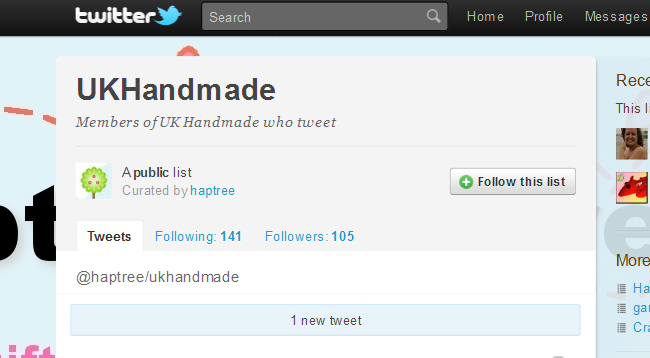
  4. I have created a list of UK Handmade Bloggers and I display the live feed from them proudly at the top of this blog, everybody loves a bit of free publicity. Displaying others tweets will result in more followers for them but also more followers for your list and of course in turn, more followers for you! 
Raku Buttons, Jude Allman

Twitter Widgets - Live streams from twitter on your blog
I have copied and pasted everything in this blue box from twitters own page because they say it so succinctly, please visit and create your own amazing twitter widgets - http://twitter.com/goodies/widgets

Profile Widget

Display your most recent Twitter updates on any webpage.

Search Widget

Displays search results in real time! Ideal for live events, broadcastings, conferences, TV Shows, or even just keeping up with the news.

Faves Widget

Show off your favorite tweets! Also in real time, this widget will pull in the tweets you've starred as favorites. It's great for moderation.

List Widget

Put your favorite tweeps into a list! Then show 'em off in a widget. Also great for moderation.


I have added a screen shot below from one of my own twitter widgets, which has a list of any tweets that mention CraftblogUK or the hashtag #CBuk - remember you can add as many of these live streams from twitter as you like!  Notice you can either copy and paste the code as a "3rd party content" gadget or just click on the "add to blogger button" which makes this so easy!

Use the auto width selection that way you can move your gadget around  your blog and it will always fit in. Make sure you pick some colours that suit your blog. I've tweaked the code so that I have a clickable link to follow in the text at the top, I'll add a tutorial on how to do that soon as it's really simple to add a few extras to the code.


I would really appreciate your comments on this subject - twitter is a subject I really love talking about! 

Also do let me know if you have created a new twitter list - your comment links are live as I am using the Disqus comment system, so people will be able to click through direct from this post and follow your new list (instructions on how to create a list in this post of mine from my haptree blog)

 
Internet